Getting started in CampDoc
Every camper’s health forms go into CampDoc. Here is how to accept your invitation, whether you are new to CampDoc or already have an account.
Which one sounds like you?
The invitation arrives within a few days after your unit registers and enters your Scout’s information. It goes to the email address entered at registration. What you do next depends on whether that email already has a CampDoc account.
I’m new to CampDoc
You have never used CampDoc with this email address.
Create your account
I already have an account
You used CampDoc before, with the same email address that got this invitation.
Log in and accept
I used a different email before
Your old CampDoc account is under another email address.
Pick one account
Accept the invitation and create your account
1
Watch for the email from CampDoc
CampDoc sends the invitation within a few days after your unit registers for camp and enters your Scout’s information. It goes to the parent or guardian email address the unit entered for your Scout.
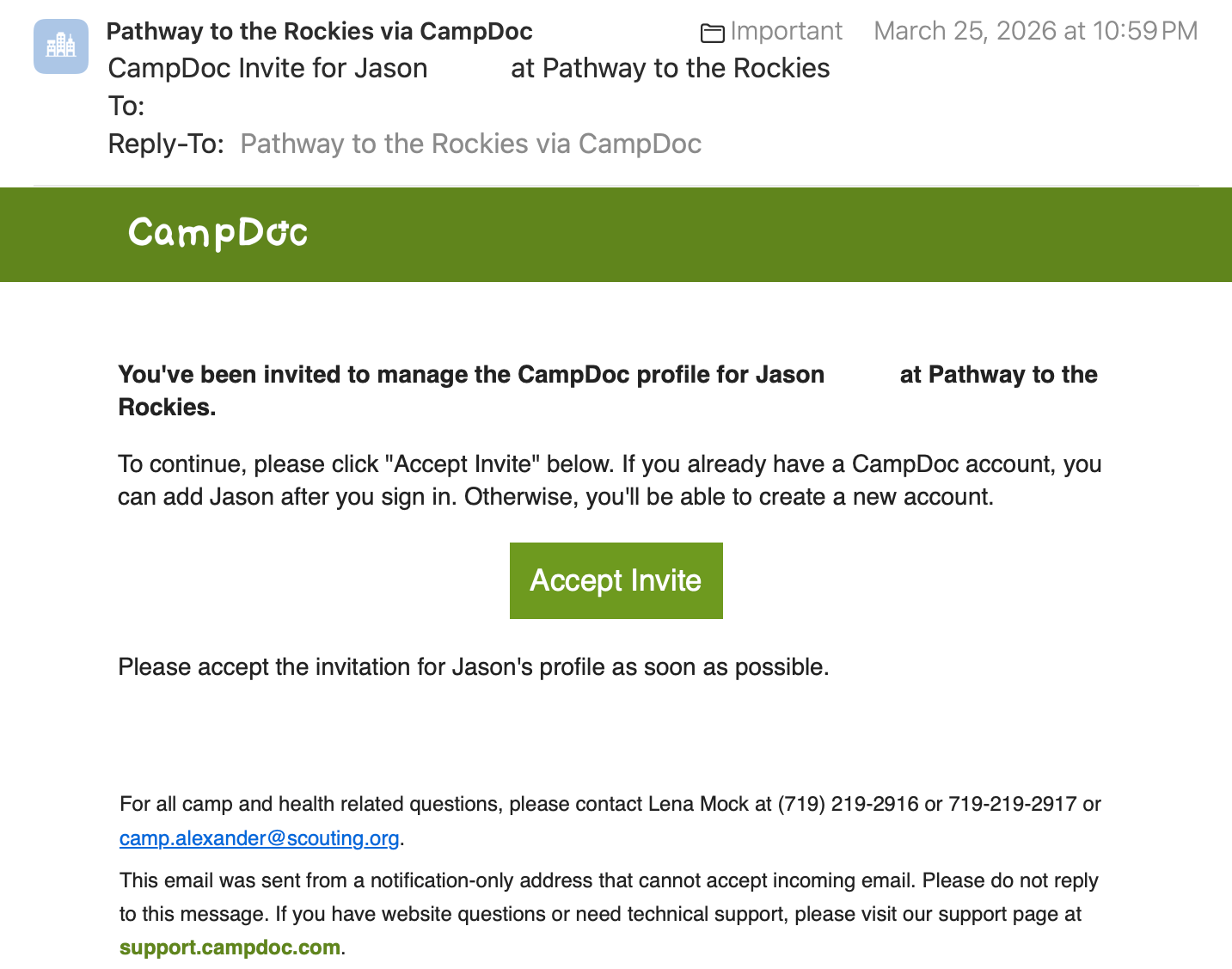
Look for an email from Pathway to the Rockies via CampDoc (sent from noreply@campdoc.com) with the subject CampDoc Invite for your Scout’s name at Pathway to the Rockies. Check your spam or junk folder, and add campdoc.com to your safe senders.
2
Select Accept Invite
Open the email and select the green Accept Invite button.
3
Confirm your email and create a password
Type the same email address the invitation was sent to, create a password, and select Continue.
4
Accept each camper
Under Invitations, select Accept Invite(s). If you registered more than one Scout with the same email, each one shows up here. Accept them all.
5
Select Get Started
That opens your camper’s health profile. Fill in each section and upload the forms. A section is done when it shows a green check mark.
Want to see each screen first? Open our step-by-step guide (opens in a new tab).
Log in. Don’t make a second account.
If the invitation went to the email you already use in CampDoc, it attaches to that account. You just need to accept it.
1
Log in at app.campdoc.com
Go to app.campdoc.com and log in with your existing email and password. Forgot your password? Use the reset link on the login screen.
2
Accept the new invitation
Look for Invitations at the top of your account and select Accept Invite(s) for each camper.
3
Review every section for this year
Your camper may already have answers from a past event. Read through each section, update anything that changed, and upload this year’s signed forms. Old forms don’t count as this year’s paperwork.
Selected Accept Invite and got a message that the link is no longer valid? That usually means the invitation already belongs to an account. Log in instead.
Choose one account and stick with it
CampDoc ties each invitation to the exact email address it was sent to. Not registered yet? Give your unit leader the email you already use in CampDoc, and the invitation will go straight to that account.
Keep it simple: use the new email
Accept the invitation with the email it was sent to and set up a new account. You will fill in the health profile from scratch, but nothing is lost.
Want your old account instead?
Email camp.alexander@scouting.org before you accept. Tell us your Scout’s name, your unit, and the email on your existing CampDoc account, and we will help send the invitation there.
Either way, use a parent or guardian email, not your Scout’s. That’s the most common reason an invitation never arrives.
Common questions
I never got an invitation.
Give it a few days after your unit adds your Scout to its registration, and check spam and junk. Still nothing? Go to app.campdoc.com, select Sign Up, enter your email, select Begin, then Re-send. If that doesn’t work, ask your unit leader to confirm your Scout has been added and that your email is spelled correctly.
I have more than one Scout coming.
Use the same parent email for every Scout at registration. Each one shows up as its own invitation in the same account. Accept them all.
Do adult leaders use CampDoc too?
Yes. Every adult camper gets their own invitation at their own email and follows the same steps.
Can both parents get in?
One parent accepts the invitation. That parent can then add another adult to the profile from inside CampDoc. Anyone you add can see and change everything, so only add people you trust with that.
I’m a unit leader. Can I see my unit?
Yes. As your unit’s group leader in CampDoc, you can see everyone’s progress and upload forms for your unit. Check a few weeks out and nudge anyone who hasn’t finished.
Something on the screen isn’t working.
Use the help button, the question mark at the top right of any CampDoc screen. For questions about our forms, email camp.alexander@scouting.org or call 719-219-2916.
Invitation accepted? Next, the forms.
Our health forms guides show every form, every signature, and who signs it.
